
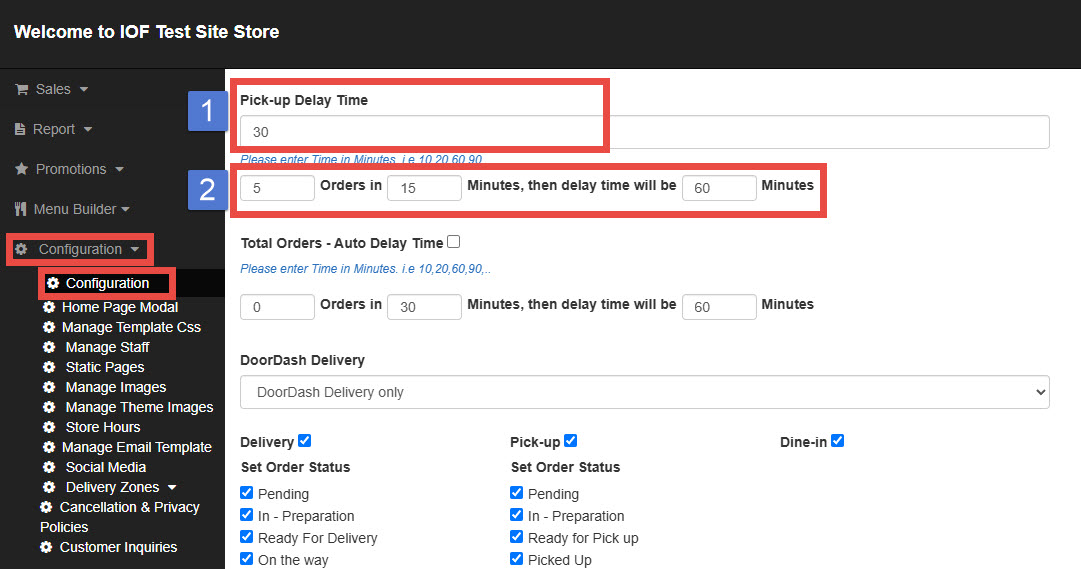
To adjust your pick-up delay settings:
1. Go to Configuration and select Configuration.
2. Scroll down and find the Pick-up Delay Time section.
Setting Details
NUMBER 1: DEFAULT PICK UP TIME (REQUIRED)
This is the standard preparation time applied to all order.
Ex. Order at 3:30 PM → Pick-up at 4:00 PM (30-minute pick-up delay)
NUMBER 2: DYNAMIC DELAY BASED ON ORDER VOLUME (OPTIONAL)
This feature allows the system to automatically increase the pick-up delay time when a high number of orders are received within a short period.
Ex 1.
If 5 orders are received within 30 minutes, the pick-up delay will changes to 60 minutes.
- If the 5 orders come within 10 minutes, pick-up delay stays at 30 minutes.
- From the 6 th order, if it’s still within a 30-minute window → pick-up delay becomes 60 minutes.

Ex 2.
If 10 orders are received within 20 minutes, the pick-up delay time will changes to 45 minutes.
- If the 10 orders come within 20 minutes, pick-up delays stays at 30 minutes.
- From the 11 th order, if it’s still within a 30-minutes window → the pick-up delay becomes 45 minutes.
