
Transaction Report Guide
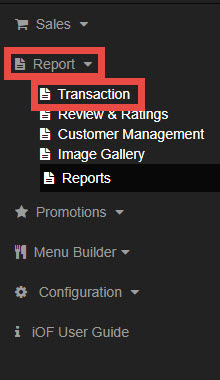
Go to Report and select Transaction.
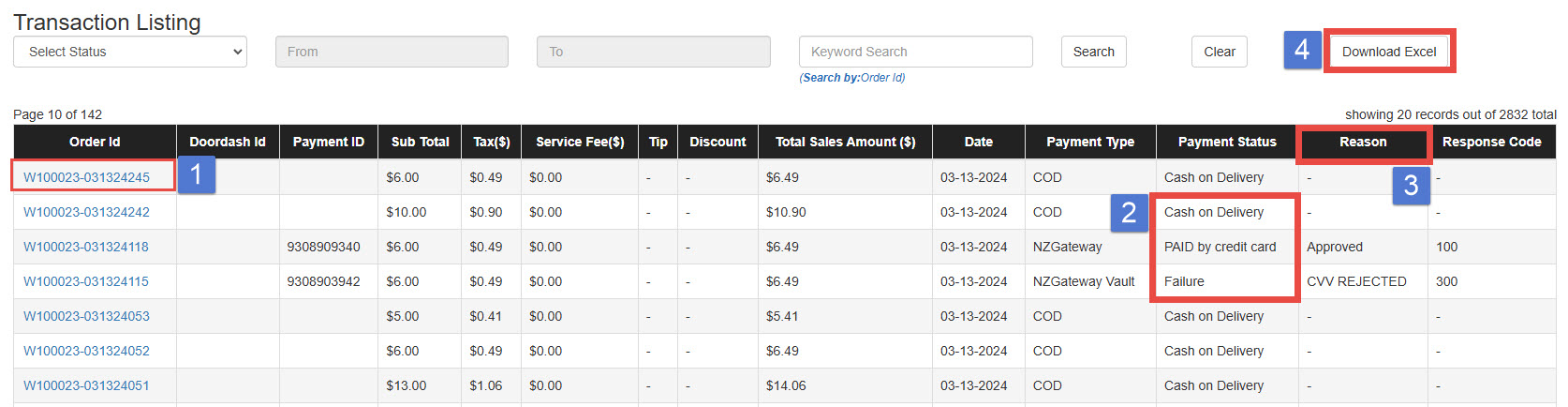
1. Order ID: Click on the Order ID to view detailed order information.
2. Payment Status: Check the status of the card transaction.
- PAID by credit card, Approved: Order was placed and PAID
- Cash on Delivery: Order was placed and NOT PAID
- Failure: Order was NOT placed and NOT PAID
3. Failure Reasons: If the payment status is failure, the customer did not complete the payment, and the
order was not processed. Common failure reasons include:
- AVS REJECTED – Incorrect billing address
- CVV2 Mismatch
- CVV REQUIRED – CVV must be entered.
- Invalid CVV – Incorrect CVV
- Issuer Declined – The card issuer declined the transaction.
- Invalid Credit Card Number
- Duplicate transaction
- Pick up card –SF – SUSPECTED FRAUD
- Do Not Honor – The bank declined the transaction.
- Insufficient funds
4. Download Excel: Export the filtered data as an Excel file.